You never know when you need a good calculator app to check the prices or calculate the tip at a restaurant. And, this is not the only use we can find for the best calculator app as in today’s world they are equipped with a wide range of features.
So, if you’re looking for an app that will fulfill all your calculating needs, take a look at the apps we’ve selected as being the best.
For Apple fans there are several exclusive apps that implement an elegant interface and come packed with some pretty interesting features.
This app is equipped with a scientific calculator that supports trigonometric and algorithmic functions, constants, unit conversion, a radian mode, and the possibility to undo or redo an operation. So, it will work great if you have math homework or you’re working on a scientific project.
The app is free but there are ads that can be annoying at a certain point. Also, you can add more features and operations but only if you want to pay. If you want the entire packages, there is also a version with all the possible features and no ads.
Soulver has all the necessary functions of a regular calculator but it also throws in some extra features to sweeten the deal. The app is equipped with unit and currency conversions and allows users to save their working sheet to continue work at a later time or to share them with coworkers. It also displays all the calculations in a straight column and has an editing cursor which is great for editing anywhere in the column. Once you do an edit, the entire stream of calculations is edited which is great in testing various hypothesis without having to remake the calculations.
In conclusion, this is an app for people who work with numbers, scientists on the run, or students who work on various numeric projects.
This is an app you want in your phone if you work with variables and equations. It even has a library of operators that contain a wide range of possible mathematical operators like trigonometry, derivatives, and complex numbers.
To make things even more interesting, there is a text editor that allows inserting notes in the worksheet. This comes in handy when you’re trying a new idea or working on different projects at the same time.
And finally, the app can be synced with iCloud to make it available on more than the one device.
Developers managed to offer an amazing tool for users taking algebra and calculus with this app. First, you have the scientific calculator equipped with the basics functions starting with basic operations and continuing with roots and logarithms.
The real interesting part of this app comes when you enter the graphing mode. Here you can draw your equations on the screen and create intersections and labeled graphs. Even more, you can work with parametric equations and polar coordinates which kick things up a notch.
New Android devices pack the computational power of a medium computer and this allowed developers to create amazing calculator apps for us. They are packed with great features and they come in a wide range of interfaces and models.
We’re starting our list with a simple app, without too many features, but with a fantastic interface and some real style. Calcu implements the basic functions of a calculator and can be even used for academic purposes but only at college level. There are the light trig functions, some physics calculations and general calculus but that’s about it.
When we mentioned this is one of the best styled apps out there we didn’t lie – this app comes with 12 themes and the keypad can be customized.
This calculator app combines a graphic calculator with graphic options and some interesting features. All the basic calculator functions are included together with the complex, scientific ones. The interface is a bit crowded and reminds you of the old calculator you used in schools. However, this is a comment problem with calculator apps that include a scientific module.
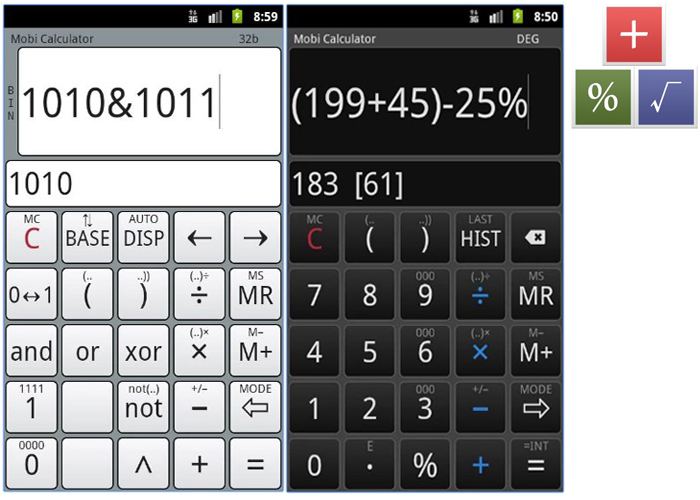
The former CubeCalculator is a powerful app that can be used either as a simple calculator or as a scientific one with logarithmic and trigonometric functions. The app also promotes two buttons that can be customized and you can use the hexadecimal, octal or binary system to do your calculations.
MobiCalculator free offers the possibility to store up to 50 lines of calculus as history. If you need more history, the pro version allows up to 1000 lines and the possibility to implement different themes.
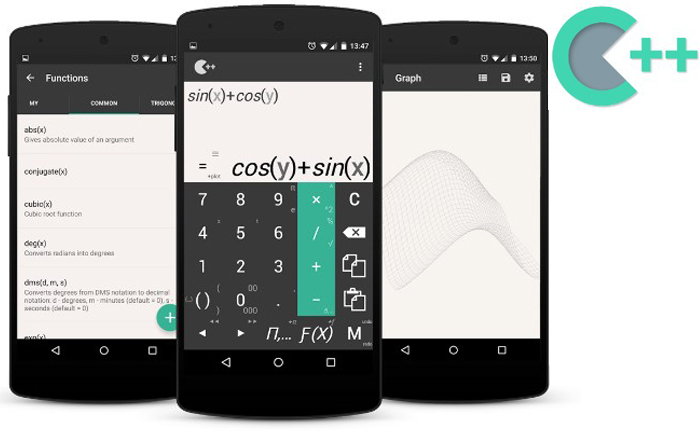
If you’re in need of a formula library and a calculator, One++ is a different kind of calculator app. It comes with the basics of a calculator and a library of formulas with over 1000 items. Formulas start from simple to complex and you can calculate a wide range of variables like velocity, BMI, or the interest rate.
The app even separates all these formulas in categories so it will be easier to find. So, if you work with formulas more than you work with other scientific operations, this calculator app is for you.
If you want a calculator app that will work on both Android and iOS, we selected two of the very best.
Wolfram Alpha is one of the most popular app developers and it feels weird to talk about them in a calculator apps article. However, they have one and their engine is quite fantastic. First, it doesn’t offer support just for math – it has information, formula, and calculations for 29 other disciplines as well.
Also, they don’t just give you the formula and expect to wrap your mind around it. They also give you detailed information, graphic representations, and explain the work process.
We know, it sounds great! Still, there is one issue: the app needs and active internet connection to work.
This is a calculator app for financial calculations and, every adult should have one. You get a wide range of formulas and calculations starting with your mortgage, currency conversion, and ending with investment returns and bonds.
You can also use the graphing mode to see how your equations evolve and you have lots of calculation templates to help you through with the task. Even more, you can create your own templates and introduce a new function in the computer.
We reached the end of our list with the best calculator apps. Let us know if you liked it or if we missed a great app you really like.
Something fundamental shifted in the world of content creation a few years ago. For a…
Ever since the first casino was opened in the 17th century, this sector has made…
Wenn Sie auch nur ein paar Stunden in Princess & Conquest verbracht haben, sind Sie wahrscheinlich schon über...
Wenn du dich in die chaotische, magische und leicht anstößige Welt von Princess and Conquest verliebt hast,...
Die Bedeutung von Ballaststoffen in ARK verstehen In ARK: Survival Evolved ist Ballaststoff einer der...
Path of Exile (PoE) ist ein Spiel, das von seiner ausgeklügelten Wirtschaft und dem Handel lebt...