If you are an Android smartphone owner, chances are you’ll want to know how to take a screenshot in Android 6.0 Marshmallow. After all, screenshots are useful to record an announcement, achievement, to remember something said, to keep track of certain pieces of information, and so on. There are two major ways to take screenshots on Android devices, but Google decided to one-up the game in Android 6.0 Marshmallow and add an additional way to snap on-screen content. We’ll cover both ways here, so read below.
How to take a screenshot in Android, lesson 1: volume down+power button combo
One of the easiest ways to take a screenshot in Android is to simply press the volume down button and the power button for a few seconds, at which point you’ll see a light flash across the screen and a small picture of the screen appear for a few seconds. This is one of the most familiar ways to take a screenshot on your Android smartphone, but Google has added one new feature.
How to take a screenshot in Android, lesson 2: Snapping on-screen content in Android 6.0 Marshmallow
Google has added a new way to take screenshots that it says is intuitive and perfect for the entire customer base. To learn how to take a screenshot in Android with Android 61.1 Marshmallow, you can perform the volume down button+power button, or you can use on-screen navigation buttons to bring it about. To use screenshot capabilities to your Android handset, however, you’ll need to update your device’s Google Now capabilities by getting the update via the Play Store.
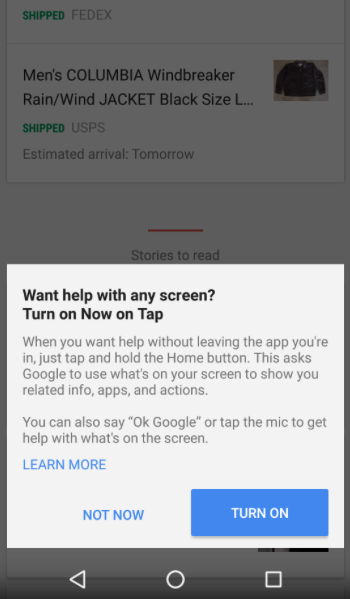
After updating, make sure it’s activated. If you don’t have Google Now as an active service, you’ll need to activate it or turn it on before taking advantage of the new screenshot feature. To turn on Google Now, press your home button 3 times and then Google Now will appear with an update for “Google Now On Tap” or something thereof. Follow the steps on screen to set up Google Now.
After you’ve set up Google Now, the next thing to do is to then test the new screenshot feature.
How to take a screenshot with Android 6.0 Marshmallow
Google has been working hard to make Google Now more relevant and useful for consumers. The company first announced the voice command assistant as one that it seemed awkward to use out in the company of other individuals, but Google’s Google Now On Tap feature allows you to use Google Now regardless of whether or not voice command appeals to you. With Google Now on Tap, you can take a screenshot within Android 6.0 Marshmallow.
To learn how to take a screenshot, press the home button and hold on slightly again. When Google Now On Tap appears, you’ll see a “share” icon at the bottom left of the screen. Tap it, and the screen will register a screenshot and send it to your gallery and notification window. From there, you can share it as much as you’d like.
These are the most basic steps to help you learn how to take a screenshot in Android. Stay tuned to Aptgadget as we bring you more news and how-tos next week.
Watching sport does not feel as self contained as it once did. It used to…
You're in the same meeting as your coworker. The deadline just got moved up by…
Imagine working alone on a late shift, driving between job sites, or checking a property…
Il y a quelques années, un changement fondamental s'est opéré dans le monde de la création de contenu. Pour un...
Depuis l'ouverture du premier casino au XVIIe siècle, ce secteur a fait...
Si vous avez passé ne serait-ce que quelques heures dans Princesse & Conquête, vous êtes probablement tombé sur...