
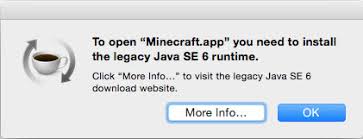

MacBook Pro'nuzu macOS'in en son sürümüne yükselttikten sonra, bazı başlangıç sorunları yaşayabilirsiniz. Bazı durumlarda kullanıcılar Premiere Pro, Adobe Photoshop, Illustrator gibi uygulamaları veya favori oyunlarını başlatmaya çalıştıklarında sorunlarla karşılaşırlar. Bir uygulamayı veya oyunu açtığınızda şu hata mesajını alabilirsiniz: "eski Java SE 6 çalışma zamanını yüklemeniz gerekiyor". Hata şöyle devam ediyor: "Bu web içeriğini görüntülemek için Java Runtime Environment'ı yüklemeniz gerekir. "Daha Fazla Bilgi..." seçeneğine tıklayın. Daha fazla bilgi seçeneğine tıklarsanız, boş bir sayfa alırsınız.
Bunu nasıl düzeltebilirim?
Sorun büyük olasılıkla uyumlu olmayan bir Java sürümünden kaynaklanmaktadır. Java'nın en son sürümü şu adreste mevcuttur https://www.java.com/en/download/. Ancak, yeni sürümü MacBook Pro'nuza yüklerseniz, sorun yaşamaya devam edebilirsiniz. Bu nedenle Java for macOS 2017 için aşağıdaki sayfaya gitmeli ve Jave SE 6'yı yüklemelisiniz: https://support.apple.com/kb/DL1572?viewlocale=en_US&locale=en_US
Java SE 6 ile Minecraft 1.8'i çalıştırabilmeniz gerekir. Sorun, Java 8u25'in en son geliştirme sürümünü yükleyerek de çözülebilir. Safari kullanarak indirmekte sorun yaşıyorsanız, Firefox'u deneyebilirsiniz.