

LG ist fest in Android verankert, seit man sich erinnern kann (das LG G5 ist nicht das erste High-End-Smartphone des Unternehmens mit Googles mobilem Betriebssystem), aber der koreanische Hersteller hat seinen Platz innerhalb von Googles mobilem Betriebssystem noch nicht gefunden. Google selbst stellt Nexus-Telefone her, die alle anderen in den Schatten stellen, wenn es um die neuesten und besten Updates geht (Android N zum Beispiel).
Abgesehen von den Updates sind die Software-Angebote, und Samsung dominiert, wenn es um Software-Funktionen in TouchWiz geht - das weitaus funktionsreicher ist als andere "Skins" von anderen Android-Herstellern. Dann gibt es noch all die anderen Teile des Smartphone-Erlebnisses (Kameras, Display, Prozessor, Akku und Akkulaufzeit usw.), und in den vergangenen Jahren hat Samsung alle anderen Android-OEMs in diesen Bereichen deutlich geschlagen.
LG steht auch im Schatten von Samsung, da beide Unternehmen koreanische Mitbewerber sind, was es für LG schwierig macht, seine eigenen Fähigkeiten zu präsentieren. Natürlich kann man auch argumentieren, dass LG einfach nicht die richtigen Ressourcen hat, um einen Giganten wie Samsung zu bekämpfen.
2016 könnte ein neues Jahr für LG werden, wenn das neueste G5 des Unternehmens die Ergebnisse erzielt, die LG sich erhofft. Das LG G5, das neueste Smartphone von LG, präsentiert ein neues modulares Design, das die "abnehmbare Lederrückseite" des LG G4 durch ein Aluminiumdesign ersetzt, das stattdessen eine abnehmbare Unterseite bietet.
Wir hier bei Aptgadget beschlossen, die Verizon-Marke LG G5 für eine Runde in den letzten Wochen zu sehen, was all der Hype ist über, und wir wissen jetzt, wie dieses Telefon stapelt sich gegen seine Rivalen. Was wir davon halten? Lesen Sie unsere Analyse unten, bevor Sie sich ein Urteil bilden.
Anzeige

Das LG G5 verfügt über einen IPS-Flüssigkristallbildschirm (LCD) mit einer Auflösung von 2.560 x 1.440 Pixeln. In der Smartphone-Welt sind Quad-HD-Displays derzeit die hellsten und besten, die man in der Smartphone-Welt bekommen kann, und das des G5 scheint eines der hellsten zu sein, die man finden kann.
Zwar gelten die Farben als naturgetreuer als beispielsweise bei den AMOLED-Displays von Samsung, aber ich finde die Farbpalette dieser Farben für meinen Geschmack nicht ideal. Ich mag helle, kräftige, ins Auge springende Farben, und LCD-Bildschirme, egal wie hoch die Auflösung ist, werden das nie bieten.
Darüber hinaus ist das Display auf dem LG G5 nicht so hell wie auf dem Samsung Galaxy S7 edge (das ich auch neben dem LG G5 getestet habe; bleiben Sie dran für unseren Testbericht zu diesem Gerät), was bedeutet, dass Sie die Helligkeitsstufen hochdrehen müssen, um die minimale Helligkeitsleistung für Samsungs AMOLED-Panels zu erreichen. Das hat zur Folge, dass die Akkulaufzeit schnell abnimmt. LCDs sind auch schwach, wenn es darum geht, den Akku zu schonen, während AMOLED-Displays die Akkulaufzeit schonen, weil die Displays selbst Licht ausstrahlen und keine Hintergrundbeleuchtung benötigen.
Im Großen und Ganzen ist das LG G5-Display jedoch wunderschön und schön anzusehen - aber nachdem man AMOLED-Displays erlebt hat, ist alles auf dem G5-Display zu dunkel. Das ist nicht überraschend, aber es ist etwas, das Sie beachten sollten, wenn Sie beabsichtigen, eine Samsung-Alternative zu testen.
LG G5 UX und Software
Einer der wichtigsten Teile des Smartphone-Erlebnisses ist die Benutzeroberfläche und die Software, da die meisten Verbraucher die Flitterwochenphase mit der Smartphone-Hardware schnell hinter sich lassen (es sei denn, es handelt sich um ein Gerät, das so wunderschön anzusehen ist, dass man es nicht mehr aus dem Gedächtnis löschen kann). Ich hatte das Bedürfnis, diesen Abschnitt hier einzufügen, weil es sich nicht um ein Telefon eines einzelnen Herstellers mit eigenem Betriebssystem handelt, sondern um das G5 von LG, auf dem Android, Googles eigenes mobiles Betriebssystem, läuft, und daher müssen wir uns überlegen, wie sich die UX von LG von Vanilla Android (nur Googles grundlegende Android-Software, nichts hinzugefügt) unterscheidet. Es ist die LG G5 Benutzeroberfläche und Software, die wir jetzt drehen.
Icons

Die LG UX wird einigen bekannt vorkommen, aber einige der LG-Symbole sind wirklich seltsam gezeichnet und müssen in LG UX 6.0 gestrichen und neu gezeichnet werden. Ein Beispiel dafür ist das Kamera-Symbol, das, wie von Technikkritikern immer wieder festgestellt wurde, wie eine Waschmaschine und ein Trockner aussieht (ja, Waschmaschinen und Trockner). Wenn es nicht so aussieht, sieht es aus wie der Augapfel von Mike "Wiz-ow-ski" (Ausspracheschreibweise) aus dem Disney-Film "Monsters Inc.", und das trifft mich jedes Mal, wenn ich das LG G5-Display einschalte.
Es ist ein ziemlich hässliches Symbol für eine Kamera, wenn man bedenkt, dass Samsung, Google und andere ziemlich schöne Symbole haben. Sicher, für die meisten Verbraucher spielt das Design des Kamerasymbols keine Rolle, wenn sie das Telefon lieben, aber etwas, das visuell wie eine schlechte Zeichnung heraussticht, wird leicht bemerkt, je länger man darauf starrt. Es ist wie mit dem platten Reifen am unteren Rand des Displays der Moto 360: Je öfter man die Uhr trägt, desto mehr fällt es einem auf. Ich habe dem Kamerasymbol anfangs nicht viel Aufmerksamkeit geschenkt, aber mit der Zeit ist es für mich zu einem größeren Ärgernis geworden, als es anfangs war.
Die Galerie-App hat ein anderes Icon-Design, das ich hässlich finde. Es versucht, eine animierte Bergszene zu erstellen, aber eigentlich erinnert es an das Symbol der Galerie-App auf dem Asus-Google Nexus 7 von 2012. Das Galerie-App-Symbol des LG G5 entspricht auch dem Desktop-Hintergrund des Nexus 5 (das von LG hergestellt wurde) aus dem Jahr 2013, und das Symbol verrät, wie alt es wirklich ist. Das Symbol sieht nicht schrecklich aus, aber es sieht kindisch aus, ohne den Realismus, den ich von Symbolen auf meinem Desktop erwarte.
Es ist nicht so schlimm wie das Waschmaschinen-Kamera-Symbol, aber es ist schlimm genug, dass auch es durch etwas "lebendigeres" und dynamischeres ersetzt werden muss. Sie können ein Thema für das LG G5 herunterladen, um diese schrecklichen Symbole zu ersetzen, aber Sie können in einige Komplikationen mit LG SmartWorld laufen (ich werde in mehr Informationen über diese später in der Überprüfung zu bekommen.).
Wenn Sie in das Dropdown-Benachrichtigungsfenster schauen, bekommen Sie mehr von LGs UX zu sehen, als Sie erwartet haben. Der Hersteller hat sich entschieden, für einen großen Teil des Benachrichtigungsfensters und des Einstellungsfeldes weiße Pastellfarben zu verwenden, mit schwarzen Symbolen und grünem "Glühen im Dunkeln", wenn Sie einen Einstellungsschalter aktivieren (z. B. um Ihre 4G-Daten zu aktivieren). Wir werden unten in den Telefoneinstellungen darauf zurückkommen, aber ich wollte darauf hinweisen, damit Sie wissen, was Sie erwartet.
Natürlich orientiert sich die Designsprache an Googles Material Design, aber ich bin kein Fan von wirklich flachen Icons, die keinerlei, um ein besseres Wort zu verwenden, "Dekoration" haben. Ich bin jemand, dem der Skeuomorphismus der Ära von Steve Jobs nichts ausmacht, daher finde ich flache Icons und UI-Design nicht so ansprechend. Dennoch gibt es eine Reihe von Herstellern, deren flache Icons ich ansprechend finde und die mich nicht abweisen. Leider schrecken mich einige der Icons von LG auf dem LG G5 ab.
Telefoneinstellungen

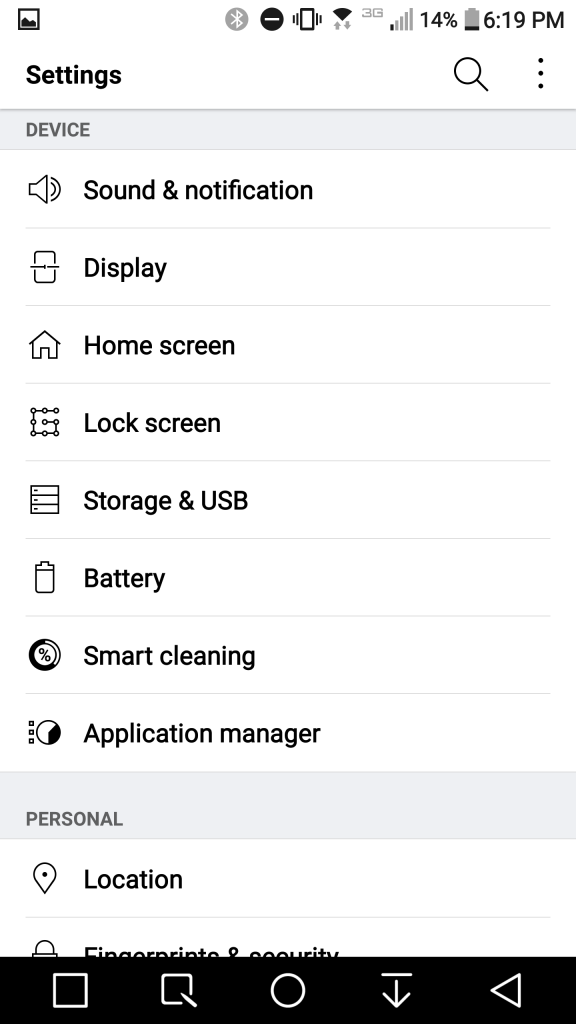
Während die Kamera- und Galeriesymbole für mich unattraktiv sind, wird es beim LG G5 noch schlimmer, wenn man die Telefoneinstellungen des G5 besucht. Die Telefoneinstellungen haben einen weißen Hintergrund mit schwarzen Wörtern und hellen neongrünen Kippschaltern, die aufleuchten, wenn Sie eine Funktion aktivieren. Während LGs Einrichtung minimalistisch erscheint und darauf ausgelegt ist, Sie zu den Einstellungen zu bringen, die Sie brauchen, wenn Sie sie brauchen, scheint es einfach eine schlechte Dekoration und anti-ästhetisch zu sein.
Wie ich bereits sagte, können Sie Themes herunterladen, die in dieser Hinsicht helfen können, aber die ursprüngliche Einrichtung aus der Box ist ein bisschen fade, wenn Sie das Galaxy S7 edge mit seinen leuchtenden Farben verwendet haben und dann zum ersten Mal ein G5 in die Hand nehmen. Das pastellfarbene Weiß mit den schwarzen Wörtern und neongrünen Kippschaltern sieht, um ein Wort zu prägen, das es in der englischen Sprache nicht gibt, "drabulous" aus (ein Wortspiel aus "fabulous" und "drab").
Das Farbschema der Telefoneinstellungen ist einfach nur trist, leblos, tot, ohne jegliche Vitalität und Leben, und es ist so langweilig, dass ich nicht in meinen Telefoneinstellungen herumhängen möchte. Das LG G5 hat keine Telefoneinstellungen, die ich attraktiv finde, vor allem, weil es scheint, als ob LG nur praktisch sein wollte, auf Kosten eines guten Designs: die Leute zu ihren Informationen zu bringen, ohne zu versuchen, ihre visuelle Seite anzusprechen). Gleichzeitig wird jemand, der wie ich schöne Kunstwerke zu schätzen weiß, die mangelnde Aufmerksamkeit für Symbole, Farben und Farbschemata in LGs UX nicht zu schätzen wissen.
Zur gleichen Zeit, abgesehen von der Farbgebung, bietet LG einige Funktionen, die Sie nicht in Samsungs Galaxy S7 edge finden werden. Zum Beispiel können Sie den genauen Prozentsatz der Helligkeit Ihres Telefons kennen (sagen wir, 35%), die Sie nicht auf dem Galaxy S7 und S7 edge finden. Als Technikkritiker und Journalist, der immer genaue Zahlen für Akkustatistiken braucht, um sie mit Familie und Freunden zu teilen, hätte ich gerne mehr Transparenz bei der Helligkeit des Galaxy S7, damit ich Nutzern helfen kann, die wissen müssen, wie man den Akku schont.
Eine weitere einzigartige Funktion des LG G5, die Sie bei vielen anderen Smartphones nicht finden werden, betrifft die Optionen für die Bildschirmabschaltung. Mit den Optionen für das Bildschirm-Timeout können Sie eine bestimmte Zeitspanne festlegen, in der Ihr Bildschirm eingeschaltet bleibt, bevor er sich ausschaltet. LG bietet Ihnen hier jedoch etwas, was das Samsung Galaxy S7 und S7 edge nicht haben: Sie können eine Option "Bildschirm eingeschaltet lassen" auswählen. Mit anderen Worten, Ihr Bildschirm kann mit dieser Option eingeschaltet bleiben, bis Sie ihn mit der Power-/Standby-Taste auf der rechten Seite des Handys ausschalten. Eine Option zum Ausschalten des Bildschirms, die den Bildschirm auf unbestimmte Zeit eingeschaltet lässt, gibt es weder beim Galaxy Note 5 noch beim Galaxy S7 und Galaxy S7 edge von Samsung.
Eine weitere wichtige Funktion, die Ihnen gefallen wird, betrifft die Home-Touch-Tasten, die Tasten am unteren Rand des Displays (die wir als Navigationstasten bezeichnen würden). LG nennt sie "Home-Touch-Tasten", nur damit Sie es wissen, und wir sagen es Ihnen, damit Sie nicht durch ihre Bezeichnung in den Home-Einstellungen des G5 verwirrt werden. Im Abschnitt "Home-Touch-Tasten" können Sie die Kombination der Tasten ändern. Bei der ursprünglichen Tastenanordnung des G5 befand sich die Rücktaste auf der linken Seite. Da ich ein eingefleischter Samsung-Fan bin, der mit Rücktasten auf der rechten Seite vertraut ist, habe ich meine Navigationstasten neu angeordnet, um eine Kombination zu erhalten, mit der ich leben kann.
Wenn Sie ein Nexus-Benutzer sind, werden Sie wahrscheinlich die ursprüngliche Einrichtung des LG G5 genießen, aber das Wunderbare ist, dass Sie 5 Navigationstasten auf dem Display des Telefons hinzufügen können (nicht nur die traditionellen 3: Zurück, Notizen und Home). Ich habe Capture+ und die Dropdown-Navigationstasten für Benachrichtigungen hinzugefügt, damit ich mit Capture+ Bildschirmmaterial aufnehmen und meine Benachrichtigungen abrufen kann, ohne meine Hände vom unteren Teil des Displays nach oben bewegen zu müssen, nur um zu sehen, welche E-Mail ich gerade erhalten habe.
Dies sind 3 Funktionen für die Telefoneinstellungen, die Sie auf Ihrem LG G5 gerne nutzen werden. Diese 3 Funktionen sind ein Hauch von frischer Luft für ein Android-Gerät, das nur eines von vielen High-End-Android-Handys ist, und es ist schön, etwas Einzigartiges von LG zu sehen, was sonst ein langweiliges Gerät wäre.
App-Schublade
LG hat das LG G5 ohne eine App-Schublade ausgeliefert, was sowohl bei eingefleischten LG-Fans als auch bei Android-Fans nicht gut ankam. Der App-Drawer ist aus mehreren Gründen wichtig. Einer davon ist, dass er es Ihnen ermöglicht, ein Foto oder ein Bild auf dem Desktop Ihres Telefons zu behalten, ohne dass es hinter App-Symbolen versteckt ist.
Wenn Sie zum Beispiel ein Künstler sind, der seine Kunstwerke auf Ihrem Galaxy S7 edge ausstellen möchte, können Sie alle Ihre Apps in die App-Schublade legen und die Bildschirme Ihres Telefons so belassen, dass sie Ihr Kunstwerk oder Familienfoto darstellen. Für mich ist das eine tolle Sache, denn ich liebe es, meine Nichte und meinen Neffen auf meinem Desktop zu sehen. In der App-Schublade kannst du alle deine Apps speichern, aber nur die, die du auf deinem Desktop haben möchtest, und die anderen ausblenden. Wenn Sie nur 5 Apps auf Ihrem Hauptbildschirm haben möchten, können Sie diese 5 auf dem Hauptbildschirm ablegen und die anderen in der App-Schublade lassen, bis Sie sie brauchen. So bleibt der Desktop Ihres Telefons übersichtlich und frei von Unordnung.
Was hat LG dazu bewogen? Wir wissen es nicht, aber es scheint, als ob einige Kunden dem Unternehmen gesagt haben, dass die Erstellung eines App-Schubfachs die Dinge für sie "zu schwierig" macht und dass ein Apple-ähnliches Layout, wie es Apple in iOS verwendet, das LG G5 für neue Kunden vereinfachen würde, die vielleicht von Apple zu LG wechseln. Es könnte sein, dass LG den App-Drawer entfernt hat, um das kommende Android 7.0 N-Update anzukündigen, aber warum sollte LG diesen vorher entfernen? Das scheint kein übliches Verhalten für einen OEM zu sein, weshalb LG gerade ein Update veröffentlicht hat, um die App-Schublade zurückzubringen. Irgendetwas sagt mir, dass dieser Schritt eher dazu gedacht war, iPhone-Nutzer anzulocken, als das LG G5 auf Android N vorzubereiten. Der App-Drawer war nicht kaputt, also warum hat LG versucht, etwas zu reparieren, das nicht repariert werden musste?
Sie sollten wissen, dass LG ihn wieder hinzugefügt hat (überprüfen Sie die Softwareaktualisierung in den Telefoneinstellungen, um ihn abzurufen), aber LG hätte ihn nicht von vornherein entfernen müssen. Offenbar ging man davon aus, dass es den Verbrauchern egal sein würde, wenn die App-Schublade entfernt wird, aber der koreanische Hersteller hat ein anderes Ergebnis entdeckt.
Immer eingeschaltetes Display (AOD)

Das Always On Display ist eine Einstellung in den Telefoneinstellungen, aber ich wollte es hier ansprechen, damit es die Behandlung bekommt, die es verdient. Das AOD, wie ich es nenne, ist eine der Standardfunktionen des Jahres, von der ich erwarte, dass sie auf allen Geräten des Jahres 2016 zu finden sein wird (auch wenn einige enttäuschen und es nicht tun), denn es ist eine praktische Funktion, auf die man, wenn man sie einmal hat, nur schwer verzichten kann.
Das AOD auf dem LG G5 hat seine Stärken: Es bietet nämlich E-Mail-, Text-, Slack-, Telegram-, App-Update- und andere Android-Benachrichtigungen, aber der einzige große Nachteil des Displays ist, dass es einfach zu dunkel ist. Bei der Verwendung des AOD (das ich seit dem Tag, an dem das G5 bei mir ankam, anbehalten habe) hatte ich zu keinem Zeitpunkt das Gefühl, dass das Display hell genug war. Wieder kann es nur sein, dass ich zu vertraut mit Samsungs Super AMOLED AOD auf dem Galaxy S7 edge, aber das G5 AOD einfach nicht stapeln.
Am ersten Tag, als ich das Gerät erhielt, war ich von den Blickwinkeln des LG G5 abgeschreckt. Ich bin kurzsichtig, was bedeutet, dass meine Weitsichtigkeit schlecht ist (bestenfalls). Wenn ich das LG G5 aus einer geringen Entfernung betrachte (z. B. von einer Couch zu einem Stuhl direkt davor), konnte ich die AOD-Benachrichtigungen des G5 überhaupt nicht sehen (ich konnte kaum die Uhrzeit auf dem AOD sehen). Dies allein ist einer der Faktoren, die das LG G5 AOD schwer verkäuflich machen.
Legen Sie das LG G5 neben das Galaxy S7 und das Galaxy S7 edge und schauen Sie sich deren AODs an; es wird nicht lange dauern, bis Sie überzeugt sind, welches Gerät besser ist. Selbst wenn Sie den AOD des Galaxy S7 und S7 edge bevorzugen, hält der AOD des LG G5 sein Versprechen, dass es nur etwa 1% Akku pro Stunde verbraucht. Ich habe das Handy gestern Morgen benutzt und es dann bei etwa 40% liegen lassen. Als ich das LG G5 wieder in die Hand nahm, nachdem es 19-20 Stunden im Leerlauf gelegen hatte, war der Akkustand auf etwa 20% gesunken (das entspricht einer Entleerungsrate von etwa 20% oder 1% pro Stunde).
On-Screen-Navigationstasten

Viele Käufer des LG G5 haben bereits frühere Smartphones von LG gekauft, daher sind Sie wahrscheinlich mit den Navigationstasten auf dem Bildschirm von LG vertraut. Gleichzeitig bin ich aber auch mit einer großen Portion Samsung-Erfahrung zum G5 gekommen, was mich in eine gute Position bringt, um Samsung-Nutzern zu helfen, die bereit sind, einem anderen Android-OEM eine Chance auf dem Smartphone-Markt zu geben.
Wenn Sie bereits seit einigen Jahren Samsung-Geräte verwenden, werden Sie sich an die Navigationstasten auf dem Bildschirm gewöhnen müssen. Während das Samsung Galaxy S7 seinen Power-Button auf der rechten Seite des Geräts und einen physischen Home-Button unten auf der Vorderseite hat (mit zwei kapazitiven Touch-Buttons links und rechts des Home-Buttons), hat das LG G5 keinen Home-Button auf der Vorderseite und keinen Power-Button auf der rechten Seite; stattdessen hat sich LG für Software-Buttons unten auf dem Display entschieden, die, wie wir bereits gesagt haben, an Ihre Vorlieben angepasst werden können.
Diese Software-Tasten sind nicht jedermanns Sache, und ich werde der Erste sein, der sagt, dass sie mir nicht gefallen. Wenn man den Bildschirm dreht, um ein Video anzuschauen, rutschen die Navigationstasten auf dem Bildschirm an den oberen Rand des Geräts - eine Stelle, an die nur wenige Menschen ihre Hände halten, wenn sie einen Film anschauen. Da ich in der Technikbranche tätig bin und Screenshots von Unboxing-Videos mache, hätte ich gerne physische Tasten am unteren Rand des Displays, die sich nicht mitdrehen, wenn sich der Bildschirm dreht. Das macht es einfacher, Screenshots zu machen, ohne dafür die Einschalttaste auf der Rückseite des Geräts benutzen zu müssen. Es verhindert auch, dass ich die Tasten selbst in einem anderen Winkel betrachten muss, wenn sie stationär bleiben würden. LG scheint zu glauben, dass es ein Problem behebt, das einige Verbraucher haben, und ihnen eine Wahlmöglichkeit gibt, aber auch diese Implementierung seiner Softwaretasten behebt etwas (in diesem Fall physische und kapazitive Tasten), das nicht kaputt ist.
Themenshop (LG SmartWorld)

LG's Theme Store, LG SmartWorld, wird in Tech-Kreisen nicht so sehr gelobt, und dafür scheint es einen Grund zu geben. Während dies ein Verkaufsargument für das LG G5 zu sein scheint, werden Sie enttäuscht sein, dass Sie beim Kauf des Verizon-Handys nicht sofort Zugriff auf den LG Theme Store haben. Verizon unterstützt den Theme Store nicht, obwohl Sie ihn direkt von der LG-Website herunterladen können (hier ist der Link dazu). Ich kann leider auch bestätigen, dass AT&T in den USA LG SmartWorld ebenfalls nicht unterstützt.
Sie können denken, dass das Herunterladen der Theme Store wird Ihre Probleme zu lösen, aber es wird nicht: Sie erhalten Zugriff auf LG Wallpaper für das G5, aber Sie werden immer noch nicht Thema Zugang. Aus irgendeinem Grund hat Verizon beschlossen, den LG Theme Store nicht zu unterstützen, während der Träger den Samsung Theme Store unterstützt.
Meiner Meinung nach ist der Samsung Theme Store zwar besser, aber LG-Kunden haben es trotzdem verdient, Themes und Anpassungen auf dem G5 zu erleben. Sie werden es nicht mit Verizon bekommen, obwohl, was mich dazu bringt, misstrauisch zu werden: wenn Verizon, Amerikas größter Anbieter, und AT&T, der zweite Telekommunikationsgigant der Nation, es nicht unterstützen, wie gut ist es wirklich?
Prozessor

Das LG G5 wird von einem Quad-Core-Prozessor, dem Qualcomm Snapdragon 820, angetrieben, der Qualcomms Vorgänger-Prozessor, den Snapdragon 810, übertrifft. Der 810 war so etwas wie eine heiße Kartoffel, aber der Snapdragon 820 hat den schlechten Ruf seines älteren Geschwisters größtenteils abgelegt.
Der Snapdragon 820 ist zwar beeindruckend, aber es gibt auch Momente, in denen er, die LG G5-Software oder beides enttäuscht. Nachdem ich das G5 nun seit Wochen benutze, kann ich bestätigen, dass es Zeiten gibt, in denen der Snapdragon 820 überhitzt und das vordere Display und die Rückseite extrem warm werden. Das ist mehr als einmal passiert, seit ich das Gerät zum ersten Mal erhalten habe, wobei die Sensoren des G5 bis zu 52 Grad Celsius (oder 126 Grad Fahrenheit) erreicht haben, bevor sie sich abkühlten und auf ihre ursprüngliche Temperatur zurückgingen.
Wie ich bereits sagte, passierte dies mehr als einmal, und ich habe nicht gespielt, um das Gerät so heiß zu machen: Dies wurde durch bloßes Web-Browsing über WiFi erreicht. Das Galaxy S7 und das Galaxy S7 edge, die beide in den USA mit dem Snapdragon 820-Prozessor ausgestattet sind, überhitzen ebenfalls manchmal, also ist das Problem nicht spezifisch für das G5, sondern für den Snapdragon 820-Prozessor.
Zusätzlich zur Überhitzung oder übermäßigen Erwärmung kämpft das LG G5 auch manchmal mit Verzögerungen. An einem zufälligen Tag habe ich das G5 benutzt, um eine redaktionelle Idee, die ich im Kopf hatte, mit Google Keep auf den digitalen Bildschirm zu tippen, aber das G5 verzögerte sich. Die Google-Tastatur hat sich bei mir selten verzögert, aber beim G5 war das der Fall. Die Verzögerung der G5-Tastatur trat nicht nur bei Google Keyboard, sondern auch bei SwiftKey auf. Ein einfacher Neustart hat das Problem behoben, aber im Gegensatz zu dem, was einige über den Snapdragon 820 gesagt haben, hat er immer noch seine Probleme.
Geekbench-Score
While the processor does overheat, its performance speaks volumes, and its benchmarks don’t lie. The LG G5 got a score of 2,323 points in single-core scoring and 4,699 points in multi-core scoring by way of Geekbench, a real-world app that measures authentic performance commensurate with that of most consumers. To put this in perspective, the Galaxy S7 edge received a single-core scoring of 2,315 points and a multi-core score of 5,198 points via Geekbench. The HTC 10, another 2016 device featuring the same Qualcomm Snapdragon 820 processor, had 2,053 points in single-core scoring and 4,725 points in multi-core scoring. While the LG G5 and the Galaxy S7 edge received similar scores in single-core scoring, the G5 isn’t quite as fast as the Galaxy S7 edge in multi-core scoring (the HTC 10 doesn’t keep up with the S7 edge, either).


Batterie
The LG G5 has been decent on battery life, providing 14-17 hours of battery life on a typical charge. The issue with battery life is, as always, tied to brightness and cellular data vs. wifi, since any of these factors can affect battery life. I was pleasantly surprised with battery life on the device, considering that it has a 2,800mAh battery housed within it, but perhaps this is where we see the strength of the Snapdragon 820: its success at optimizing processes and performance.
LG seems to have optimized its battery, with the device giving me as much battery (and then some) that I could handle on any given workday. Using the device at work on a 10-hour day, I’d leave work with plenty of battery (at least 30%) remaining, sometimes more or less depending on what I did with it at work. I’ve been intentionally reckless with the handset, setting my screen timeout option to “keep screen turned on” just to see if it would drain battery life; fortunately, the phone has still managed to get 10 hours SOT performance even on long workdays.
In a review where I share my criticism of LG and its G5, let me say this: the LG G5 has surprised me in battery life. The 2,800mAh battery is more than sufficient for my needs (and I’ve used it nearly every day since it landed at my doorstep on April 20, with a battery that doesn’t seem to slow down. Reading for hours, watching YouTube videos here and there, it is as fast as reviewers have said it is.
The LG G5 had SOT (screen on time) scores that could match those of the Galaxy S7 edge, even with 800mAh less battery than its Samsung rival. At the same time, though, the G5 did have one hiccup: it drained, with only cellular data running, from 81% to 61% in about 30-45 minutes, which is something of an anomaly for a handset that’s worked well otherwise.
Even with the good battery life, it still doesn’t match that of Samsung’s Galaxy S7 edge, which could get me anywhere between 16-21 hours of battery life on a single charge. You can view the LG G5 battery stats in the photo gallery at the end of this section.
I tested the device with Skype video calls, where I got to see just how well LG’s 2,800mAh battery could hold up to the competition. LG’s battery could carry me into 3 hours of Skype video calls before dying; a subsequent test carried me to 4-4.5 hours on video chat. While this seems sufficient, it doesn’t best Samsung’s Galaxy S7 edge that took me through 5-6 hours of Skype calling. With a larger battery, I’d expect Samsung’s Galaxy S7 edge to win the contest, but then and again, few consumers will use the device for video calling and won’t mind this anyway.
The LG G5 has USB Type-C charging, and this helps the device charge in as little as 65-67 minutes, though it could take up to 90 minutes to charge if you place the device’s charging wire on a surge protector or alternate charging source outside of the typical wall charging. You can arrive at 70% battery life after just 38-39 minutes of charging time.
One peripheral issue that is somewhat tied to the battery concerns the battery stats on the G5. Unlike battery stats of the Galaxy S7 edge, the LG G5 doesn’t display as many. I’ve had days where I’ve been reading through some news apps for hours at a time; unfortunately, the G5 doesn’t register that I’ve spent so many hours in a given app. Outside of the “screen,” “phone idle,” and “cell standby,” few other apps get mentioned in my battery stats. Telegram, a secure messaging app does, but even then, seldomly. Outside of the ones mentioned above, sometimes I’ve seen “network” and “Google app” appear on the battery stats, if not “Google Play Services,” but little else.
The problem with the LG G5 battery stats is that it’s hard for me, even with the screenshots below, to prove to you or anyone else that I’ve been using the device. I could get these stats from simply staring at the screen, so there’s little proof outside of these to prove what I’m doing. Of course, I have taken photos of my recents menu to show my usage of the device, but it just highlights the problem with transparency regarding LG’s battery stats. Android Marshmallow brought more detailed battery stats to Android, but sadly, it seems as though LG missed the point completely. Scour the internet looking for tech reviewers who’ve also reviewed the G5, and you’ll see similar battery stat layouts to mine. It just doesn’t make sense that tech reviewers can’t get detailed battery stats on a high-end Android device.
I’d like to see LG provide more detailed battery stats in its statistics. It’s disappointing to use Google Keep for 5 hours, along with the use of Google’s Chrome browser, and not see either appear on my LG G5 battery stats.


Kamera

The LG G5 camera setup consists of dual cameras, one main camera and one additional wide-angle camera that is akin to what I call a “panorama camera.” The main camera is a 16MP back camera with an f/1.8 aperture, but the additional wide-angle camera is an 8MP camera with an f/2.4 aperture.
In other words, the second back camera, touted by many as LG’s greatest feature, turns out to be one of its greatest undoings. Yes, it gives you wide photos at the tap of a button on a screen, but its aperture is insufficient for lowlight situations. Why didn’t LG give the second camera the same aperture and megapixel count as the first one? We don’t know the answer to this question, but we do know that it would improve whatever photos you may take on your own handset.
We suggest that you take photos outdoors if you intend to make the most of these cameras, since indoor photos will still bear the typical “yellowish” tint due to indoor lighting. Even outdoors, though, the LG G5 has OIS but it doesn’t show all that much when compared to the Galaxy S7 edge. It appears as though photos taken tend to be blurry, and the only photos that really shine with LG’s latest back camera (sans the wide-angle lens) are those taken at a distance (say, photos of the sky and trees).
With a lowlight aperture that isn’t as top-performing as, say, the Galaxy Note 5 with its f/1.9 aperture, it makes you wonder why the dual camera setup is being touted as LG’s winning combo in the LG G5. We think LG should improve its wide-angle lens for next year’s LG G6, and that the company should increase its megapixel count and lowlight aperture to help it be just as good as (or rival) the primary back camera. Without similar performance, consumers will see the wide-angle back camera as nothing more than an impressive gimmick from afar that will never go mainstream.


Build Quality, Design, and Implementation
It is here in yet another important discussion of the LG G5 that we find out what else LG offers consumers in this year’s flagship. The G4 was a smartphone that was made of plastic, with LG resorting to plastic and leather back covers that remained removable to accommodate the removable battery that many consumers demand (and by keeping expandable storage with the veteran microSD card slot).
While LG retained a number of factors that consumers wanted, the company’s build quality was questionable indeed. Apart from the famous leather brown back cover with double stitching that appeared in press photo after press photo, LG also made some purse material back covers (yes, there’s no other way to describe the red, blue, green, and yellow back covers resembling female purses) that were the ugliest I’ve ever seen.
This year, though, LG’s build quality in the G5 is something respectable: the company traded in the plastic and faux metal look for a genuine leather look that’s buried beneath a coat of paint (primer). Don’t be alarmed if you don’t feel the cold, hard metal build quality: LG has already gone on record with its statement that it buried the metal beneath some primer on the device. The coat of paint isn’t water-resistant (we’ll cover this in some detail below when we cover design), but the build quality has improved. If I saw the G5 at a distance, I’d pick it over the leather-backed G4 any day.
With that said, though, the metal LG G5 is a step up from the plastic design of yesteryear’s LG G4, but there are still some problems with the company’s build in terms of design and implementation. It is to those that we now turn.
Design
We’ve covered a lot about the LG G5, particularly its software, battery, and camera performance, but we decided to save the best discussion of the device for last. After all, the LG G5 isn’t just another plain Jim phone; rather, it’s a phone that is known for its modular design as well as button placement.
First, the button placement. I covered the on-screen navigation buttons in the software section, but LG does have its volume rocker on the left side (which was formerly on the backside; the G5 is the first LG phone to have a side volume rocker) and its fingerprint sensor/power button double on the very back of the device, close to where the volume rocker once sat. The side volume rocker is typical of what Samsung has been doing in the Galaxy S, Galaxy S Active, and Galaxy Note series for some time, and we’re glad to see LG finally bring this design over to the G5. Yes, I’m aware that some LG G4 users won’t like the button placement change, but I welcome it.
I do think that LG didn’t take button placement changes far enough, though: the company added a fingerprint sensor this year, the first for the G series, but decided to follow its design of the Nexus 5X and add it on the back of the device where the volume rocker was. If the volume rocker wasn’t in an optimal location on the back of the phone, what made LG believe that the fingerprint sensor should go on the back of the device?
Yes, LG has some reason behind its fingerprint sensor implementation: the company wanted to place the fingerprint sensor where your fingers automatically rest on the back of the device; at the same time, however, the fingerprint sensor is embedded in the power button, which makes its back cover placement problematic. As someone who’s always taking screenshots of unboxing videos, it was difficult to use the volume rocker on the front of the device and the power button on the back of the device to capture a screenshot. On the Galaxy S7 edge, I need only press the physical home button and the power button (on the right side) to take a screenshot.
If you don’t use LG’s Capture+ home touch button (software implementation only) to get screenshots, you’ll be forced to use two physical buttons at two different places on the handset. Perhaps LG wants users to take advantage of Capture+, but I see no reason for them to when the software feature itself mandates stylus integration (there is no set stylus given as an accessory with the LG G5).
As for the fingerprint sensor, it lies on the back of the device, and is rather well implemented. Its location seems to be an intuitive move until you consider that many individuals don’t use their phones on the desk, but instead, keep them in their hands regularly. Can you use your fingerprint sensor if your phone is lying flat on a table or desk (and the sensor is placed on the back of the device, which is on the desk)? No.
This is what makes the fingerprint sensor a waste of time to set up and use, and what makes a home button with an embedded fingerprint sensor a much better, more natural choice for users. Users who are making the most of their phones will struggle to use the back fingerprint sensor when Samsung, Apple, HTC, and even OnePlus have embedded sensors into their home buttons. It’s a successful trend that I don’t understand why a company like LG would buck against.
The back of the LG G5 features the fingerprint sensor-embedded power button as well as LG’s dual camera and flash setup. While it’s admirable to see what LG would do with dual cameras, the question remains: why implement them in such a way that, as one tech reviewer has said, they look like two robot eyes (the power button being the nose of the robot) on the back of the handset? If design is important, and beauty and precision matter, then LG missed it here. I’m not a know-it-all when it comes to implementation, but if Samsung’s Galaxy S5 couldn’t get away with looking “like a giant Band-Aid,” as one famous tech reviewer said, then LG’s G5 can’t get away with looking like it’s got robot eyes on its back.
As for the fingerprint sensor and power button, I’m a firm believer that this setup on the back of the device is not a good move. LG seems to combine the power button and fingerprint security into one button, which some perceive as a wise step in eliminating multiple buttons, but the company doesn’t seem to know what it means to craft an intuitive experience. Most smartphones on the market now feature home buttons (including the new HTC 10, Moto G, and the upcoming OnePlus 3), and it just doesn’t add up as to why LG chooses to remain stubborn and combine these two functions and place them on the back of the device.
The power button is important for those who want to take a screenshot using it and the Volume Down button (hold both down at the same time), and, in this regard, LG’s G5 is a step up from the G4 that didn’t have any buttons on the front or side and had all volume buttons on the back of the device with no fingerprint sensor in sight.
My aunt has an LG G4 and didn’t even have the faintest idea about how to take a screenshot. I even struggled to show her how to take one until I examined the device even further, because LG has done its best to craft a minimalistic experience (the fewer [buttons], the better). The problem with this is that buttons are a way for new users to learn how to navigate the device – so, if you strive to remove them from a handset, you’ll likely push consumers to some handset that does provide them.
The LG G5 is better this year because 1) the volume rocker is on the left, a familiar layout, and 2) there is a fingerprint sensor, but the experience now seems fragmented. As I take screenshots of whatever’s on my display, I can’t recall the number of times I attempted to screenshot something and ended up turning down the volume because of the buttons and their placement on the device (one on the side, one on the back). It’s a different and awkward implementation of hardware buttons as compared to those on the Galaxy S7 edge that allow me to use the power button (on the right side) and the home button (at the bottom of the front display) to screenshot something.
The fingerprint sensor is in an awkward place because you have to train your fingers and learn a specific placement to get the sensor to work. In contrast, I don’t have to worry about finger placement on the Galaxy S7 edge: I can have my fingers be placed in any myriad of ways while seeing the way I intend to use the fingerprint register – then just place my finger on the home button whenever I access the contents of my phone and bypass my lock screen. I can also use my Galaxy S7 edge on any surface, including flat ones, but the LG G5 is limited in this regard because the fingerprint sensor, on the back of the phone, prevents you from unlocking the phone if it sits on the arm of your couch.
The primer coating that prevents the cold, hard metal feeling on the device isn’t water-resistant. Sure, the handset isn’t either, but something about the coating must be said. I left my G5 in the rain for 10 minutes, unexpectedly (it fell out my pocket), and when I returned, I picked up the handset. The next day, I started noticing that my fingerprint sensor was peeling, with the paint coming off the small sensor. Since LG resorted to using a coat of paint atop the metal build, the primer is vulnerable to the elements. Unlike Samsung, LG didn’t implement water or dust resistance (or high element resistance) for its handset.
Now, we go on to the new portion of the LG experience: modularity.
LG G5 Modular Implementation

The LG G5 isn’t just another smartphone on the market, but a modular one. What does it mean for the G5 to be modular? It means that, with the new phone, you can take parts off the phone and attach other items to it (what LG calls “modules”).
The way to take advantage of the modular LG G5 is to detach the bottom portion of the phone. First, press the small button on the left side of the bottom of the phone (where the speaker and USB Type-C port are located), then slide out the bottom portion until you see the battery. When you remove the bottom portion, you’ll notice that the battery is connected to the modular piece. In order to get the battery aloose, you’ll need to pry it apart from the modular piece, then take a new battery and attach it to the same modular piece before sliding the connected combo back into the G5.
If this process sounds exhausting, that’s because it is exhausting. The old way of removing the battery in the G4 involved taking off the back cover, popping in place the new battery, and putting the cover back on: 3 steps, easy-peasy. Unfortunately, the new LG G5, in its efforts to have a sophisticated metal unibody, a display with few buttons on the front (one on the back and a volume rocker on the left side), and retain the removable battery, made what was simple and effective (the old removable battery method) complex and more difficult. It’s nearly tiring to remove the battery now, and the cumbersome process is made even more cumbersome because you have to pry apart the battery from the module piece (and hope that you don’t break either item).
Add to this the fact that the modules are expensive and some are unavailable for the US market, and LG’s problems with the G5 grow exponentially. The modules currently available for the US are the Cam Plus (priced at $69.99), the LG 360 VR headset ($199.99), and the 360-degree camera ($199.99). Another module is available, called the B&O Hi-Fi DAC, but LG will not release this for the North American market (the company has yet to provide an answer as to why). The modules are quite expensive considering that you’ll pay $624 full retail price (or $26 a month for 24 months) for the G5 on Verizon’s network, which makes investing in these modules a hard sell.
Since the modules were unavailable at the time I received the device, I did not get to review them for this review specifically. As I gather more information on the modules, however, I’ll be sure to return and update this review.
Abschluss
Before concluding with words, I’d like to take time to encapsulate what I’ve said here about the LG G5 with “pros” and “cons.”
Vorteile:
- Always On Display provides app notifications, Google notifications, and detailed notifications
- Main display, as a Quad HD IPS LCD is pleasant to view, though not up to par with AMOLED displays
- USB Type-C charging ensures your device goes from 0 to 100 in a little over an hour
- Brightness percentages help you replicate battery life more precisely
- Battery life is incredible for a handset with a reduced battery capacity (2,800mAh vs. The G4’s 3,000mAh battery)
- G5 build quality is impressive and the device feels sturdy in hand
- Battery is removable and lets you quickly recharge
- Device stays cool most of the time
- The volume rocker is correctly placed on the left side of the device
- The G5’s dual-lens camera setup allows you to take images up close and at a panorama view; these, plus the “auto,” “simple,” and “manual” camera controls give users more control over their photography experience
- LG offers a theme store (SmartWorld) to let users customize the look and feel of their devices
- The G5 is affordably priced as a flagship, with many carrier and unlocked models selling for as low as $400 currently on eBay
Nachteile:
- The primer coating steals the “cold metal” feeling that all consumers want when purchasing a metal handset
- The removable battery is even more difficult to remove from the G5 than in previous models
- The G5 does get excessively warm when quick charging (not just the USB Type-C reversible cable)
- The Always On Display is just too dim for distance viewing, making notifications irrelevant
- The modules are just too expensive and not all of them are available worldwide, including the US
- The 16MP primary back camera isn’t good, even with OIS, doesn’t have much digital zoom ability and has lots of noise in photos and the lens before shots, and the secondary camera, placed at 8MP with an f/2.4 aperture, is fun to use but doesn’t work well in all cases and provides photos that are too dark
- The LG SmartWorld theme store isn’t supported on AT&T or Verizon’s network in the US, so these customers are stuck with a bland-looking UX
- LG’s pre-installed UX is too bland with odd colors (pastel white, black icon traces, and glow green toggles), and icon design is so simplistic here that it’s horrendous to look at
- LG implemented a metal build quality but forfeited wireless charging, a more convenient way to charge the G5 than USB Type-C charging
- The fingerprint sensor/power button on the back of the device is unintuitive and difficult to use when you must take a guess at finger placement to register your fingerprint and unlock the device; the fact that the volume rocker points toward the display and not the back cover is even more indicting
- The dual camera setup on the back of the device is horribly designed; LG has to work on fixing these cameras to coexist without such a terrible camera bump and hump that resembles a robot
- Battery stats are too generic, with little information about how battery life is consumed
At the end of the day, it’s possible that more could be added to the pros and cons we’ve mentioned here, but it goes without saying that there is never enough page space for the most exhaustive reviews, is there?
The LG G5 isn’t a terrible device. LG has optimized its 2,800mAh battery to a point where using this handset can be a real joy. But it becomes less of a joy when the Always On Display is too dim to see, the fingerprint sensor is on the back and feels unnatural, the phone coating starts to peel off after just two weeks of use, removing the battery, an action once easy that has now turned cumbersome, among other problems.
LG doesn’t master intuitiveness, and I fear that the company doesn’t know what it means to create an intuitive experience. The company claimed that with the LG G2 three years ago that placing your fingers on the back of the device was a natural move, but it isn’t natural for most individuals (which explains why so many rival companies have implemented a fingerprint sensor-embedded home button instead. The same can be said for the new modular implementation of the removable battery, a method requiring consumers to line up the battery with certain small slots on the battery rather than let them take the battery out of its compartment and pop a new one in.
In the final analysis, the LG G5 seems to be a solution in search of a problem with a modular design that appeals to a side of us that we didn’t know was there – or that we didn’t really care about. I mean, yes, it’s nice to have phones that could become easy to repair, allowing diehard tech geeks to “fix” their audio or camera when they want, but why not implement all these “modules” into the G5 itself without mandating additional modules for $70 and $200 each? And the future of this modular phone’s support is terribly in question.
LG wanted to bring fun back to phones, but I fear that the fun takes too much work and eliminates what little fun is left rather than adding to it. So with that said, I think that the LG G5 appeals to a certain type of consumer who’s willing to try modularity because it’s the new fad, and who doesn’t seem to mind back buttons and something of an unintuitive experience because of the new cameras. As for me? I’m going to be honest and say that this device isn’t for me.
LG’s customer service is also a problem. The company says that you have to register for the free LG G5 battery promo on its own website. I did as instructed, expecting my free G5 battery, but it never came. When I contacted LG about the missing battery that never made it to my residence, I was told that a representative would get in touch with me about it. It’s a month later, and I’ve still received no follow-up email from LG, nothing to show that the company even cares about me being a disgruntled customer. In contrast, I have a Galaxy S7 edge wireless charger that was lost in transit to my residence from Amazon and, upon contacting them, received a free replacement with free one-day shipping, no questions asked. This is another indictment for LG: when your product is already questionable enough, and you don’t try to meet consumer needs when they have a grievance about their free battery, you’re only sinking your own ship.
When it comes right down to it, LG’s G5 doesn’t have what it takes to best its fellow countryman and rival, Samsung with its Galaxy S7 and Galaxy S7 edge. Before you plunk down money on LG, I suggest giving Samsung’s 2016 beauties a spin.