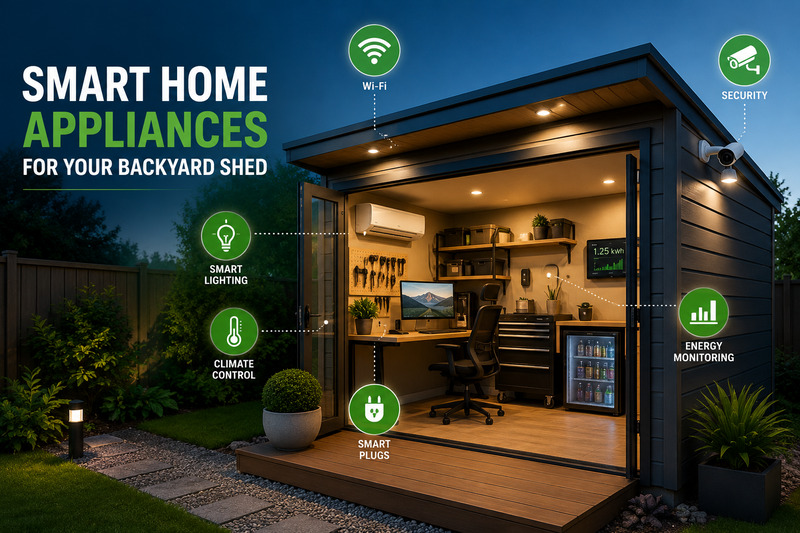

Backyard sheds are no longer just places to store tools, lawnmowers, and garden equipment. Many homeowners now use them as home offices, workshops, gaming rooms, creative studios, or quiet places to relax.
If you want to turn your shed into a useful modern space, smart home technology can help.
The right devices can improve comfort, security, internet access, lighting, and energy use. But before adding smart gadgets, you need to make sure the shed itself is ready for them.
Here are the most useful smart home upgrades to consider.
Start With the Right Shed Setup
Before buying smart lights, cameras, or appliances, make sure your shed can safely support them.
Heat, moisture, dust, and poor airflow can damage computers, routers, batteries, and other electronics. This is especially important in Australia, where outdoor buildings can become very hot during summer.
If you are building a new shed, working with an experienced shed builder can help you plan the space properly from the start.
Important features to consider include:
- Good insulation
- Proper ventilation
- Weather sealing
- Enough power outlets
- Safe electrical wiring
- Protection from moisture
- Shade for windows
- Space for cables and networking equipment
If you need new electrical wiring or fixed power points, use a licensed electrician.
Getting these basics right first will make the rest of your smart shed setup much easier.
1. Reliable Wi-Fi or Ethernet
A strong internet connection is one of the most important parts of a smart shed.
Without reliable Wi-Fi, smart cameras, lights, speakers, thermostats, and other connected devices may not work properly.
If your shed is close to the house, a mesh Wi-Fi system may be enough to extend your signal outdoors.
For sheds that are further away, you may need:
- An outdoor Wi-Fi access point
- A stronger mesh Wi-Fi setup
- A wired Ethernet connection
A wired connection can be especially useful if you plan to use the shed as a permanent office, gaming room, or studio.
Before buying smart devices, test the internet speed inside the shed. This can help you avoid connection problems later.
2. Smart Climate Control
A backyard shed can become very hot in summer and cold in winter.
Smart climate control can make the space much more comfortable.
A Wi-Fi-enabled air conditioner or smart climate controller lets you control the temperature from your phone. You can also create simple schedules and automations.
For example, you could:
- Cool the shed before you start work
- Turn the air conditioner off when the room is empty
- Adjust the temperature automatically
- Close smart blinds during the hottest part of the day
- Run ventilation when the room becomes too warm
Smart climate control can also help reduce wasted energy.
The Australian Government’s smart homes guide explains how connected devices can help households manage energy use and schedule some appliances at better times.
The goal is not simply to control your air conditioner from your phone. A good smart setup should help you use it only when needed.
3. Smart Plugs and Power Strips
Smart plugs are a simple and affordable way to control regular electrical devices.
They can work well with items such as:
- Desk lamps
- Monitors
- Redner
- Chargers
- Fans
- Entertainment devices
Smart power strips can also reduce standby power use by turning devices off when you are not using them.
However, smart plugs are not suitable for every appliance.
Do not automatically connect high-powered tools, heaters, compressors, or other heavy equipment to a standard smart plug. Some devices may use more power than the plug is designed to handle.
Always check the power rating before connecting equipment.
For workshop tools, an energy monitor may be safer and more useful than remote switching.
4. Smart Lighting
Smart lighting is one of the easiest upgrades for a backyard shed.
Smart lighting systems use bulbs, switches, and motion sensors to automatically illuminate a room when someone enters and turn the lights off after it’s vacant.
This is useful because sheds are easy places to leave lights on by mistake.
If you use the shed as an office, adjustable smart lighting can also make the space more comfortable.
You might use brighter light during the day and warmer, softer light in the evening.
Outdoor smart lighting can also improve safety. Motion-activated pathway lights or floodlights can make it easier to walk between the house and shed after dark.
5. Smart Security Cameras and Sensors
A modern shed can contain expensive equipment such as computers, tools, gaming devices, bicycles, or audio gear.
That makes security important.
A smart security setup may include:
- Outdoor security cameras
- Door sensors
- Motion sensors
- Smart locks
- Outdoor security lights
- Phone alerts
If you already use a smart security system in your home, it usually makes sense to use the same system in your shed.
This keeps everything easier to control from one app.
Apple users with Ring devices may also find our guide on how to use Ring with HomeKit helpful.
When installing cameras, make sure they mainly cover your own property, entrances, and paths.
6. Temperature and Humidity Sensors
Temperature and humidity sensors are small devices, but they can be very useful.
A shed may become much hotter, colder, or more humid than the main house, especially when nobody is using it.
A smart sensor can warn you when conditions become too extreme.
This can help protect items such as:
- Computers
- Batterien
- Tools
- Documents
- Musical instruments
- Electronics
Some systems can also trigger other devices automatically. For example, a temperature sensor could switch on ventilation when the shed becomes too warm.
If your shed has plumbing, a sink, or a fridge, you may also want to add a water leak sensor.
7. Smart Energy Monitoring
A shed with computers, lighting, air conditioning, chargers, appliances, and tools can use more electricity than you might expect.
Smart energy monitoring can help you see where that power is going.
Some smart plugs can measure the energy used by individual devices.
For a larger setup, an electrician may be able to install energy monitoring for the entire shed circuit.
Energy monitoring can help you:
- Find devices using too much power
- Reduce unnecessary energy use
- Compare the cost of different appliances
- Adjust when you use certain equipment
- Make better use of rooftop solar
If you already have solar panels, you may be able to run some shed equipment during periods of strong solar generation.
8. A Compact Smart Fridge
A fridge is not essential for every shed, but it can be useful if the space is used often.
A small fridge makes sense in a home office, gaming room, workshop, or entertainment area.
Some smart fridges offer features such as:
- Temperature alerts
- Door-open alerts
- Remote controls
- Energy monitoring
However, smart features should not be your first priority.
For a fridge that runs all day, energy efficiency, size, noise level, and reliability are usually more important than app control.
A simple rule is worth remembering:
Choose a good appliance first. Choose a smart appliance second.
Keep Your Smart Devices Secure
Adding more smart devices also means adding more devices to your home network.
That makes basic security important.
Try to:
- Use strong and unique passwords
- Turn on two-factor authentication when available
- Keep device software updated
- Buy products from trusted brands
- Remove devices you no longer use
If your router allows it, you may also want to place smart home devices on a separate network.
This can help keep them separate from computers containing personal or work information.
It is also a good idea to choose devices that work with the smart home system you already use.
That might include:
- Apple Home
- Google Home
- Amazon Alexa
- Home Assistant
Products that support Matter may also make it easier to use devices across different smart home platforms.
What Should You Install First?
You do not need to upgrade everything at once.
For most smart sheds, this order makes sense:
- Power and electrical setup
- Wi-Fi or Ethernet
- Climate control
- Beleuchtung
- Security
- Temperature and energy sensors
- Extra convenience devices
Your priorities will depend on how you use the shed.
For a backyard office, Wi-Fi, lighting, and climate control may be most important.
For a workshop, security and energy monitoring may matter more.
For a gaming or entertainment shed, you may want to focus on internet speed, cooling, lighting, and audio equipment.
The best smart shed is not the one with the most gadgets. It is the one that uses technology to make the space more useful.
Die Quintessenz
Turning a backyard shed into a smart space can make it more comfortable, secure, and practical.
Start with the basics. Make sure the building has good insulation, ventilation, safe electrical wiring, and reliable internet access.
Then add smart devices that solve real problems.
Smart lighting can save energy. Climate control can keep the space comfortable. Cameras can improve security. Sensors can protect your equipment. Energy monitoring can help reduce running costs.
When these systems work together, your shed becomes more than a storage space.
It becomes a connected part of your home that is easier and more enjoyable to use.